

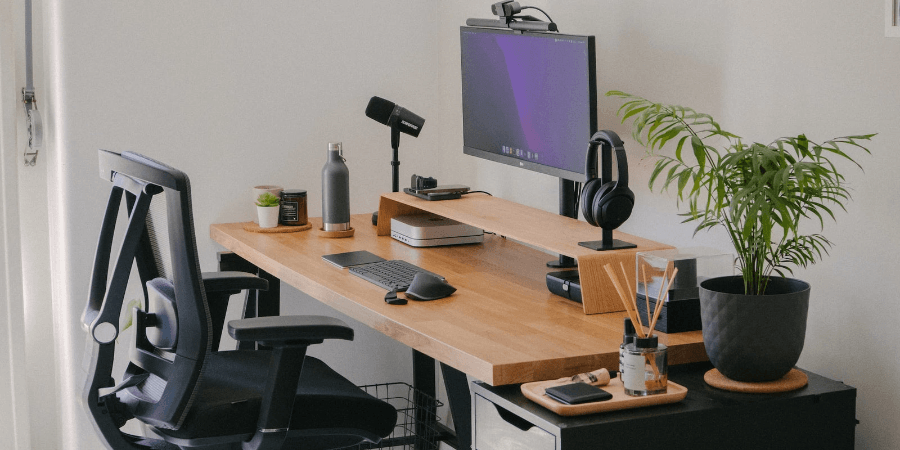
Creating Your Ideal Workspace: Ergonomic Tips and Tricks for a Productive Home Office
Working from home offers flexibility and convenience, but it also presents unique challenges. A poorly designed home office can lead to discomfort, fatigue, and decreased productivity. Creating an ergonomic workspace is crucial for maximizing your efficiency and well-being. This guide provides practical tips and tricks to help you build a productive and comfortable home office environment.
Why Ergonomics Matters:
Ergonomics is the science of designing and arranging things people use so that the people and things interact most efficiently and safely. 1 In a home office context, this means optimizing your workspace to minimize physical strain and maximize comfort.
- Back Pain: Incorrect posture and lack of support can contribute to back pain and other musculoskeletal issues.
- Neck Pain: Staring at a screen that’s too high or too low can strain your neck muscles.
- Eye Strain: Prolonged screen time can cause eye strain, headaches, and blurred vision.
- Carpal Tunnel Syndrome: Repetitive movements and awkward wrist positions can increase the risk of carpal tunnel syndrome.
- Fatigue and Reduced Productivity: Discomfort and pain can lead to fatigue and decreased productivity.
Essential Ergonomic Tips and Tricks:
- Invest in a Good Chair: A supportive and adjustable chair is the foundation of an ergonomic workspace. Look for a chair with adjustable height, lumbar support, armrests, and tilt.
- Optimize Your Monitor Placement: Position your monitor at arm’s length and at eye level. This will prevent you from straining your neck by looking up or down. Use a monitor stand or adjustable arm to achieve the correct height.
- Use an External Keyboard and Mouse: Using an external keyboard and mouse allows you to position your monitor further away and maintain a more comfortable posture.
- Take Regular Breaks: Get up and move around every 20-30 minutes. Take short breaks to stretch, walk, and give your eyes a rest. The Pomodoro Technique can be helpful for structuring your work and breaks.
- Proper Desk Height: Your desk should be at a height that allows you to type with your elbows at a 90-degree angle and your wrists straight. If your desk is too low, you may need to raise it with risers. If it’s too high, consider an adjustable keyboard tray.
- Optimize Lighting: Proper lighting is essential for preventing eye strain. Avoid glare on your screen by using indirect lighting and adjusting the brightness of your monitor.
- Organize Your Workspace: Keep your workspace clean and organized. Have everything you need within easy reach to avoid unnecessary stretching or reaching.
- Ergonomic Accessories: Consider using ergonomic accessories, such as a wrist rest, footrest, or vertical mouse, to further enhance your comfort.
- Standing Desk (Optional): A standing desk can be a good option for reducing sedentary behavior. However, it’s important to use it properly and alternate between sitting and standing.
- Cable Management: Organize your cables to prevent tripping hazards and keep your workspace tidy.
Creating a Comfortable and Inspiring Environment:
Beyond ergonomics, creating a comfortable and inspiring environment can also boost productivity.
- Personal Touches: Add personal touches to your home office, such as plants, artwork, or photos, to make it a space you enjoy spending time in.
- Minimize Distractions: Try to minimize distractions in your home office. This might mean closing the door, turning off notifications, or using noise-canceling headphones.
- Natural Light: If possible, position your desk near a window to take advantage of natural light.
- Temperature Control: Maintain a comfortable temperature in your home office.
The Importance of Investing in Your Well-Being:
Creating an ergonomic home office is an investment in your well-being and productivity. By prioritizing ergonomics and creating a comfortable environment, you can maximize your efficiency and enjoy working from home.
Call to Action:
What’s one ergonomic change you will make today to improve your home office setup? Share your commitment in the comments below!